

Building automation workflows and AI agents can be frustrating. You’re connecting nodes, configuring integrations, and trying to remember what each piece does and how it all fits together. One misconfiguration tanks the whole workflow. You’re left debugging in the dark, unsure where things went wrong.
We’ve added an AI Workflow Assistant directly into TaskAGI’s workflow builder. It answers questions about your workflow in real-time, explains what each node does, catches potential issues before they become problems, and suggests next steps based on what you’ve already built.
Think of it as having an expert workflow builder sitting next to you while you work.
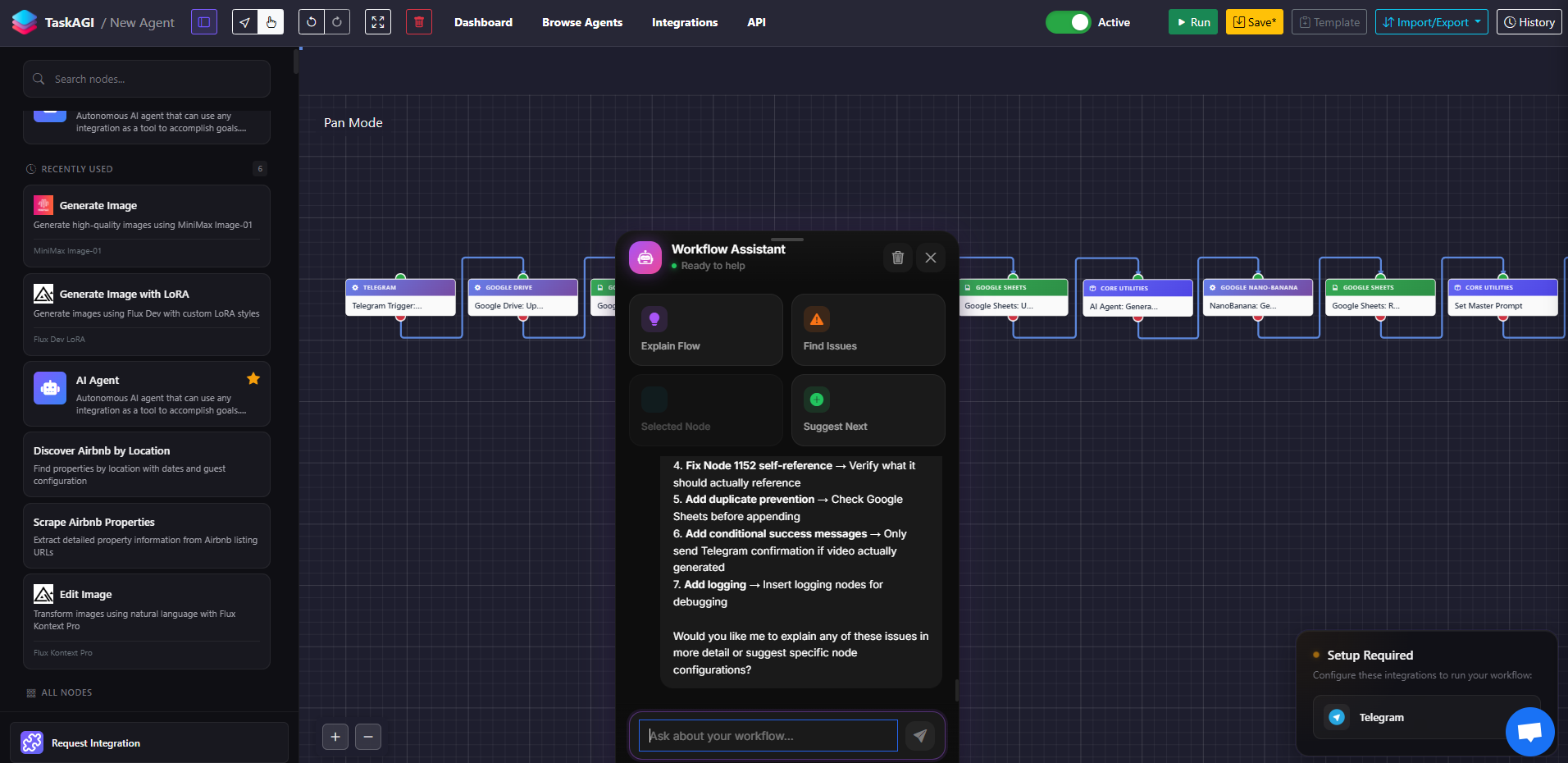
What the Workflow Assistant Does
The AI assistant lives at the bottom of your workflow builder and gives you four immediate capabilities:
Explain Your Entire Flow
Hit “Explain Flow” and the assistant walks through your entire workflow step-by-step. It tells you what each node does, how data moves between them, and what the end result should be. Useful when you’re building something complex and want to validate your logic before testing.
Find Issues Before They Break Production
The assistant scans your workflow and flags potential failure points. Missing required fields? Incompatible integrations? Logic that doesn’t make sense? It catches these before you deploy. This alone saves hours of debugging.
Get Context-Aware Node Explanations
Select any node in your workflow and ask the assistant about it. It explains what that specific node does, what inputs it needs, what it outputs, and how it relates to the rest of your workflow. No more hunting through documentation.
Get AI Suggestions for Next Steps
Stuck on what comes next? The assistant suggests logical next nodes based on what you’ve already built. It understands your workflow context and recommends the most relevant integrations and actions.
How It Actually Works
The assistant runs on Claude Haiku, Anthropic’s fastest AI model, which means responses stream back to you in real-time. You’re not waiting around for the AI to think.
It reads your actual workflow data—every node, every connection, every configuration—so it’s giving advice based on your specific setup, not generic templates. When you select a node, the assistant knows exactly which node you’re looking at and can answer questions about it specifically.
The conversation history stays within your session, so you can ask follow-up questions, dig deeper, and iterate on your workflow without losing context.
Real Workflow Examples
Example 1: Building a Lead Qualification Workflow
You’re creating a workflow that pulls leads from your CRM, scores them with AI, and routes high-value leads to your sales team. You connect a CRM node, add an AI evaluation node, then add a conditional split. You’re not 100% sure the data flows correctly between the CRM and the AI node.
Select the AI node and ask the assistant: “What data is this node receiving from the CRM?” It tells you exactly what fields are available, whether they match what the AI model expects, and flags if anything’s missing. You catch the issue before testing.
Example 2: Debugging a Failing Workflow
Your workflow was working last week. Now it’s failing silently. You hit “Find Issues” in the assistant. It scans the workflow and tells you: “The Stripe integration node requires an API key that isn’t configured” or “The email sending step will fail because the recipient field is empty.”
Instead of guessing what broke, you have a clear list of problems to fix.
Example 3: Learning While Building
You’re new to TaskAGI and not sure how certain integrations work together. You build a workflow connecting Zapier, an AI model, and a webhook. Ask the assistant: “Explain my flow.” It walks you through exactly what happens, step-by-step, in plain English. You learn how the pieces fit together while actually building.
Why This Matters
Faster workflow creation: You’re not context-switching to documentation or trial-and-error testing. The assistant answers questions right where you’re working.
Fewer broken deployments: Catching issues before you go live means fewer failed automations, fewer manual fixes, and fewer frustrated team members waiting for workflows to work.
Lower learning curve: New users can build more complex workflows faster because they have an expert explaining what everything does as they build.
Better workflow quality: The assistant suggests optimizations and next steps based on AI analysis of your workflow, not just random guesses.
Common Questions
Does the assistant see my data?
The assistant reads your workflow structure—the nodes, connections, and configurations—but not the actual data flowing through your workflow. It understands your setup without seeing sensitive information.
Can I use the assistant with any workflow?
Yes. The assistant works with any workflow you build in TaskAGI, regardless of which integrations you’re using. It understands the TaskAGI node system and can explain any combination of nodes.
What if the assistant’s suggestion doesn’t make sense for my use case?
Treat the suggestions as starting points, not rules. The assistant is helping you think through your workflow, not making decisions for you. You’re still in control of what you build.
Is there a limit to how many questions I can ask?
No. Ask as many questions as you need during your workflow building session. The conversation history clears when you leave the workflow, but while you’re working, you can iterate and dig as deep as you want.
How fast are the responses?
The assistant streams responses in real-time, so you see answers appearing as it generates them. Most responses appear within 2-3 seconds.
Get Started
The AI Workflow Assistant is available now in TaskAGI’s workflow builder. Open any workflow, and you’ll see the assistant panel at the bottom of your screen. Start with “Explain Flow” to see how it works, then try selecting a node and asking a specific question.
The more you use it, the faster you’ll build workflows. Less guessing. More shipping.
Leave a Reply