
You can now route workflows intelligently based on values—without building a chain of nested IF statements. TaskAGI’s new Switch node lets you branch workflows in multiple directions based on matching logic, similar to a switch/case statement in code.
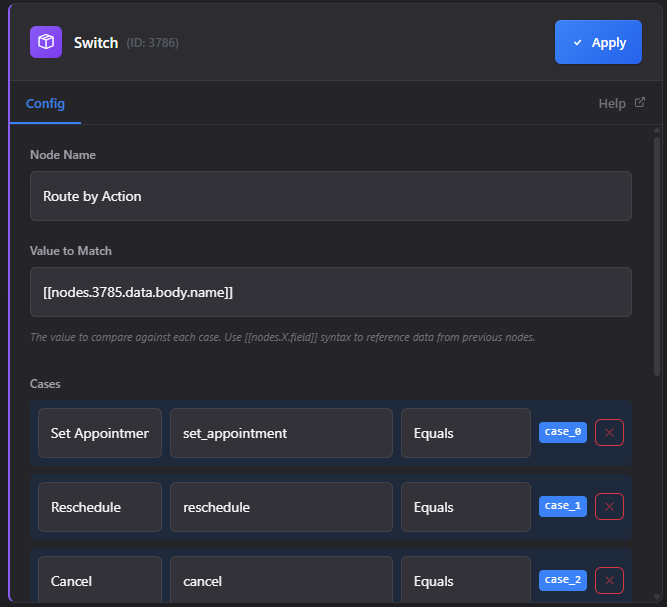
This means cleaner workflows, faster routing decisions, and the ability to handle complex branching scenarios that used to require messy conditional stacking.
What Is a Switch Node?
A Switch node evaluates a single value against multiple conditions and routes your workflow down different paths based on what it finds. Instead of connecting IF node after IF node, you define cases once and let the Switch handle the routing.
Think of it like a decision tree: “If the webhook action is create_booking, send it here. If it’s cancel_booking, send it there. If it’s reschedule_booking, send it somewhere else. If none of those match, use the default path.”
The Switch node supports 12 comparison operators, so you’re not limited to simple equality checks:
- Equals — exact match
- Contains — substring matching
- Starts with — prefix matching
- Ends with — suffix matching
- Regex — pattern matching for complex logic
- Greater than / Less than — numeric comparisons
- Case-sensitive / Case-insensitive — control string matching behavior
- And more for specific matching scenarios
Each case you define becomes an output handle on the node (case_0, case_1, case_2, and so on), plus a default branch that catches anything that doesn’t match.
Why This Matters for Your Workflows
Before Switch nodes, handling multi-way branching meant one of two things: either you built a chain of nested IF nodes (which gets messy fast), or you used multiple webhook triggers to split logic across different workflows.
Both approaches are inefficient. Nested IFs become hard to read and maintain. Multiple workflows duplicate logic and create synchronization problems.
A Switch node solves this by letting you handle all branching logic in one place. Your workflow stays readable, maintainable, and easier to debug when something goes wrong.
Real-World Use Cases
Routing webhook requests by action type — When you receive a webhook, the action field often tells you what just happened. A Switch node can instantly route create, update, and delete actions to different AI agents or automation paths.
Handling API response status codes — Different API responses need different handling. Route 200 responses to success handlers, 4xx responses to error logging, and 5xx responses to retry logic—all from one node.
Branching based on user roles or content types — Check a user’s role and send them to role-specific workflows. Or evaluate content type and route to the appropriate processor (images to one handler, PDFs to another, text to a third).
Replacing complex conditional chains — If you’ve built workflows with 5+ nested IF nodes, a Switch node can flatten that into a single, cleaner structure.
How to Use the Switch Node
The setup is straightforward:
- Add a Switch node to your workflow canvas
- Connect the value you want to evaluate (this could be a webhook field, API response, user input, or any upstream node output)
- Define your cases — For each case, specify the comparison operator and the value to match against
- Set a default branch — This path executes if no cases match (optional but recommended)
- Connect downstream nodes to each output handle based on your logic
The Switch node uses first-match-wins logic, meaning it evaluates cases in order and takes the first one that matches. This matters if your cases could overlap—order them so the most specific conditions come first.
Example: Appointment Booking Agent
TaskAGI includes a new appointment booking agent template that demonstrates Switch node routing in action. The workflow receives webhook events for different booking actions and routes each to a specialized AI agent:
- New booking requests → Confirmation agent
- Cancellation requests → Cancellation handler agent
- Reschedule requests → Rescheduling agent
- Inquiry requests → Information agent
- Anything else → Default handler
Instead of building this with five separate IF nodes or five separate workflows, the Switch node handles all routing in one clean step. Each AI agent gets triggered with the right context and can focus on its specific job.
Switch Nodes vs. Nested IFs: What’s the Difference?
You can technically build multi-way branching with nested IF nodes. So when should you use a Switch node instead?
| Aspect | Nested IF Nodes | Switch Node |
|---|---|---|
| Readability | Gets messy with 3+ branches | Clean and scannable, any number of branches |
| Maintenance | Hard to modify—changes ripple through the chain | Add or remove cases without restructuring |
| Performance | Evaluates each condition sequentially | Optimized for multi-way branching |
| Operators | Limited to basic IF logic | 12 operators including regex and numeric comparisons |
| Use case | Simple binary decisions (yes/no) | Routing across multiple paths |
Use nested IFs for simple binary decisions. Use Switch nodes when you’re routing to three or more different paths.
Comparison Operators Explained
The 12 operators give you flexibility beyond basic equality:
String matching: Equals, Contains, Starts with, Ends with, Regex. Use regex when you need pattern matching (like validating email formats or extracting specific data patterns).
Numeric comparisons: Greater than, Less than, Greater than or equal, Less than or equal. Route based on quantity, price, count, or any numeric field.
Case sensitivity: Both string and numeric operators support case-sensitive and case-insensitive variants. This matters when comparing user input or API responses where capitalization might vary.
The regex operator is particularly powerful if you’re evaluating complex patterns—like routing based on domain names, phone number formats, or structured data patterns.
Building Cleaner Workflows
Switch nodes encourage workflow architecture that’s easier to understand and modify. Instead of a tangled tree of conditionals, you get a single decision point with clear output paths.
This makes onboarding new team members faster (they can understand the logic at a glance) and reduces bugs (less nesting means fewer edge cases to miss).
If you’re currently using Make, Zapier, or N8N, you’re familiar with similar routing nodes. TaskAGI’s Switch node works the same way—it’s a standard workflow pattern that most automation builders expect.
FAQ
Can I use a Switch node with dynamic values? Yes. The value you’re evaluating can come from any upstream node—webhook data, API responses, database queries, or previous node outputs.
What happens if no cases match? The workflow follows the default branch. If you don’t set a default branch, the workflow stops at that node.
Can I use regex patterns in the Switch node? Yes, the regex operator lets you match complex patterns. This is useful for validating formats or extracting specific data structures.
Do cases evaluate in order? Yes, the Switch node uses first-match-wins logic. Cases are evaluated top to bottom, and the first match wins. Order your cases so more specific conditions come before general ones.
How many cases can I add? There’s no hard limit, but in practice, 5-10 cases keeps workflows readable. If you need more, consider breaking logic across multiple Switch nodes or using regex to consolidate similar patterns.
Next Steps
If you’re building workflows that branch based on status codes, webhook actions, user roles, or content types, try replacing nested IFs with a Switch node. You’ll get cleaner workflows and easier maintenance.
Check out the appointment booking agent template in TaskAGI to see Switch node routing in action. It’s a solid reference for building your own multi-branch workflows.
Leave a Reply